One device.
Many phones.
Total separation.

Real Android phones that live on a server, streamed to your device in real time.

SidePhone gives you full virtual Android phones you reach from your Android, iPhone, or browser. Run work apps and accounts on a phone that lives on your own server — or ours — with nothing stored on the handset. Keep as many SidePhones as you need. No second device, no MDM agent crawling through personal life.

open source · self-host or hosted · android · ios · web · alpha

Provision. Install. Stream.

A virtual Android phone runs on the server. Your physical device just streams it on demand — no work apps installed, no work data stored locally.

Request access →
01  / provision

Spin up a virtual phone.

An admin creates virtual Android phones from the manager — self-hosted on your own server or cloud, or on our hosted infrastructure. Each phone runs server-side with its own apps and data.

deploy: self-host · or hosted
02  / install

Install the app, or open the web.

Use the SidePhone app on Android or iOS, or just a browser. Pair to a phone with a one-time access token. Add as many phones as you're given — they all show up in one place.

clients: android · ios · web
03  / stream

Tap to stream it live.

Open a phone and it streams to your screen in real time over WebRTC — tap, type, and use it like a local phone. Work apps and data stay on the server; nothing is stored on your handset.
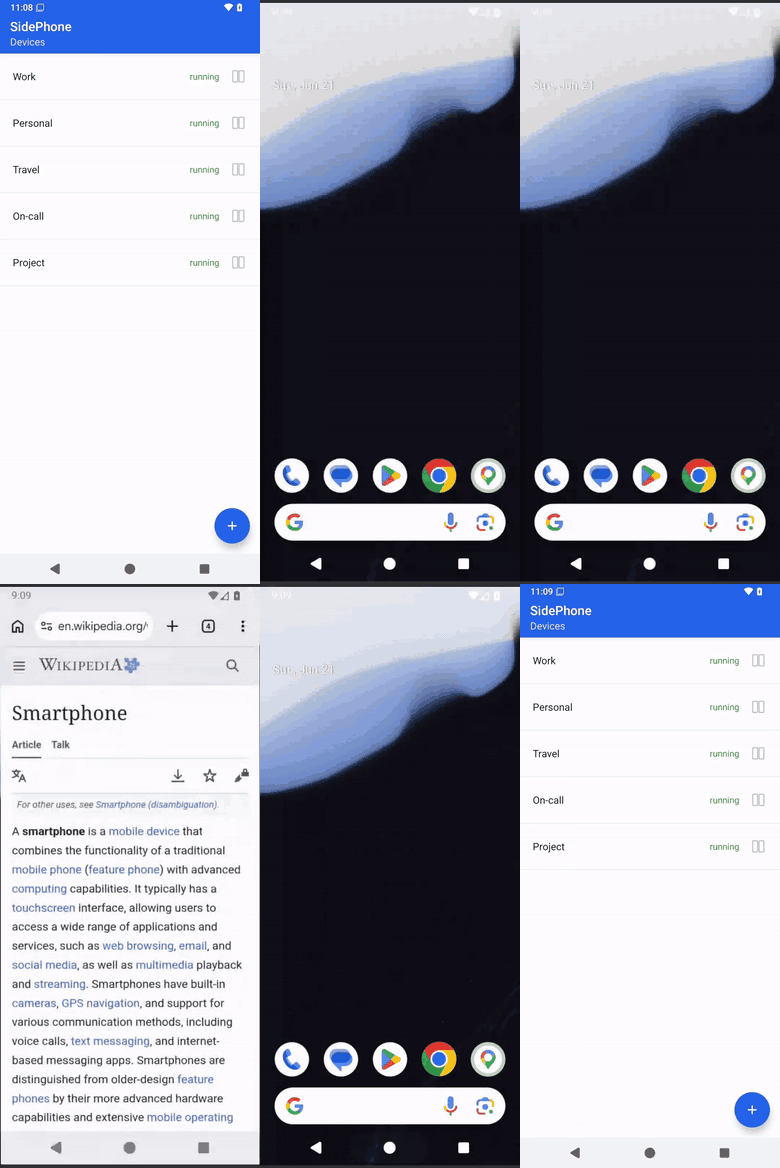
stream: WebRTC · always encrypted
The SidePhone app: tapping a phone opens the live remote Android phone, streamed in real time.

Four reasons it replaces the second handset.

A clean separation between personal and corporate, without the friction or surveillance that comes with the status quo.

// secure by design

Work data lives where you put it.

The virtual phone runs on your server — never alongside personal apps. Every session is encrypted, and nothing work-related is stored on the physical handset.
data stays in your instance self-host or hosted
encrypted streaming sessions WebRTC
nothing stored on the handset stream only
MDM agent watching personal apps
// convenient

Many phones, one app.

Keep as many virtual phones as you need — work, on-call, projects — all in the same app. Open one, use it like a local phone, switch to another. No reboot, no second device.
personal
your handset
work · pixel
virtual phone
// sustainable

One handset, not three.

Manufacturing a smartphone uses a battery, rare metals, and a plastic shell — and most corporate phones are barely used. Eliminating second and third devices halves an employee’s footprint.
devices per employee 3 → 1
batteries manufactured −66%
e-waste at end of life −66%
individual footprint cut by half
// open source

Run it yourself, or let us host it.

The whole stack — manager, emulator images, and clients — is open source. Self-host it on your own server or cloud, or use our hosted service. No black box, no lock-in.
fully open-source stack manager · images · clients
self-host on your own server your infra
or use our hosted service alpha
vendor lock-in

Built for the people who shouldn't be carrying three phones.

Anyone with strict data rules, on-call rotations, or work that follows them across borders. Doctors were our first design partner; the same problem shows up everywhere.

// healthcare
Hospital staff
Patient data and work apps stay server-side, off the personal handset — across shifts and wards.
// legal & finance
Attorneys & accountants
Privileged client data has to stay inside the firm. Personal device can stay personal.
// defense & gov
Contractors & field staff
Sensitive data never touches the handset. If the device is lost, nothing leaks with it.
// leadership
Executives
A clean separation between board comms and the family group chat. No work profile theater.
// remote work
WFH employees
Corporate apps without shipping a second handset to every home office.
// travel
Journalists abroad
Source material stays in the newsroom's server. Cross borders carrying just your personal phone.
// disposable
Untrusted apps & one-offs
Spin up a SidePhone to isolate a nosy or sketchy app, or to hand a contractor a phone for one project — keep it off your personal device and delete the whole thing when you're done.
// shared
On-call & shared devices
Hand off a shared virtual phone between colleagues — no extra hardware to pass around.

Questions, answered.

Short version: it's a virtual Android phone you stream from a server you run — or one we run. Open source, in alpha. Happy to walk you through it.

Request access →
What exactly is a SidePhone?

A SidePhone is a full virtual Android phone — apps, accounts, files — that runs on a server. The device you hold just streams it in real time. Nothing important is stored on the handset.

How is this different from MDM?

MDM manages a physical device, then trusts that device with corporate data. SidePhone never puts work data on a personal handset to begin with. There's nothing to wipe remotely, nothing to leak when the phone is stolen, and no agent watching the user's personal life.

Where does the data live?

Wherever you choose. SidePhone is open source: self-host the manager and virtual phones on your own server or cloud, or use our hosted service. Either way the data stays in the instance you run.

Can one user have multiple SidePhones?

Yes. As many as you're given — work, on-call, per-project — all in the same app. You pick which one to open, use it, and switch to another.

Which devices do I need?

Your own. The SidePhone client runs as an app on Android and iOS, or in any browser, on whatever device you already have. No corporate hardware to procure, ship, or recycle.

Is it open source?

Yes — the whole stack is being open-sourced: the manager, the Android emulator images, and the Android, iOS, and web clients. Run it yourself, or let us host it for you.

How do I get access?

SidePhone is in alpha. Email info@sidephone.io with a bit about your use case and we'll set you up — self-hosted or on our infrastructure.

Try SidePhone in alpha.

We're in alpha testing. Tell us a bit about your use case and we'll set you up with access — self-hosted on your own infrastructure, or on ours.

open source · self-host or hosted · info@sidephone.io